Showing posts with label Digital. Show all posts

Friday, January 3, 2020

New Year, New Pixel Scrapper Blog Train Freebies

Hello and Happy New Year! I'm running a little late but here is my contribution to the first Pixel Scrapper blog train of 2020. The theme is Sweaters and Hot Cocoa, but in my part of the country, it couldn't feel less like sweater and hot cocoa weather!

I hope you find my contribution useful! Find the links below the previews.

Digital elements, freebies, sweaters, hot cocoa, winter, January, 2020, digital scrapbooking, planner, snow, snowflakes, frost
Sweaters & Hot Cocoa Elements

digital scrapbook papers, freebies, free, winter, sweaters, hot cocoa, January, 2020, digital, papers, knit, snow, snowflakes, frost, pixel scrapper, blog train
Sweaters & Hot Cocoa Papers

Sweaters & Hot Cocoa Elements
Sweaters & Hot Cocoa Papers

Thanks so much for visiting! Please share your creations, I'd love to see them!
Feel free to leave comments as well, I'd love to hear what you think!


Friday, November 30, 2018

December 2018 Pixel Scrapper Blog Train: Retro Holly Jolly

I haven't participated in the Pixel Scrapper blog train in quite some time, so I'm excited that I finally have something to contribute!  This month's theme is Retro Holly Jolly.  I'm not sure I've captured that feeling, but I hope you can find some use for what I've made.  You can find the links to download the papers and elements below the previews.
Pixel Scrapper, Blog train, digital scrapbooking, digital, free, December, Christmas, Winter, photoshop
Retro Holly Jolly Papers

Pixel Scrapper, digital scrapbooking, blog train, free, digital, christmas, winter, December, holly jolly, retro, photoshop
Retro Holly Jolly Elements
Download the papers here.
Download the elements here.

I hope you enjoy scrapping all of your Christmas memories this season!  Please be sure to check out the wonderful contributions from the other designers at Pixel Scrapper, they really knocked it out of the park with this train!  I'd love to see what you create if you're able to during this busy time of year.  Leave a link below so I can check it out.  May you have a Very Merry Christmas and a Wonderful New Year!  Thanks so much for coming by!  

Wednesday, August 15, 2018

Freebie:Pixel Scrapper CU Blog Train August 2018

A year has passed and I decided to dust off my blog and post a freebie for the Pixel Scrapper CU blog train.  I hope it's useful to you!  You may download at the link below the preview.
Scrapbooking, CU, Pixel Scrapper, Digital, 2018, Freebie, Overlays, Weather, Clouds, Sun, Snow, Rain
Weather overlays

 You can download from google drive here.

Thank you for taking a look and I'd love to see what you create!  Feel free to leave a link in the comments.

Tuesday, August 15, 2017

Pixel Scrapper Commercial Use Blog Train-August

I've finally gotten a chance to get back at my computer to create after several months of working and not feeling very creative.  Since I missed the August blog train I thought I'd try creating for the commercial use one this month instead.  The theme is Fall Papers and since Fall is my favorite time of year it started my creative juices flowing.  I've also been wanting to make a Halloween themed kit, so this was the perfect opportunity to get started. 

I've made three Halloween overlays for this blog train and I hope you can find use for them.  Download link below the preview.
Pixel Scrapper, commercial use, blog train, Fall, Autumn, Freebie, Digital, Scrapbooking
Fall Paper Overlays
Download from Google Drive here.

These overlays are for commercial use!  Enjoy!  Feel free to include a link in the comments so I can check out what you made!

Thanks for stopping by and Have a Crafty Day!


Saturday, April 1, 2017

Pixel Scrapper Blog Train: Raindrops and Rainbows

Hello again!  Time for another blog train at Pixel Scrapper.  This month is all about raindrops and rainbows.  I played around a bit making the patterned papers by learning how to make rain in Photoshop and attempting to make some gradients, and generally just having a little creative fun.  I hope you can find some use for them in your projects.

Download links are below the previews.
Pixel Scrapper Blog Train, Digital Scrapbooking, April, 2017, freebie
Raindrops & Rainbows-patterned papers
Download patterned papers from Google Drive here.

Pixel Scrapper Blog Train, Digital Scrapbooking, Freebie, April, 2017
Raindrops & Rainbows-solid papers


Download the solid papers from Google Drive here.

Don't forget to check out the rest of the blog train creations at Pixel Scrapper this month!

As always, I'd love to see what you create, so feel free to leave some links!  

Have a Craft Day!


Wednesday, March 1, 2017

Pixel Scrapper Blog Train Freebies- In The Pocket

Hello again!  I took last month off from the Pixel Scrapper blog train due to lack of internet connection.  I'm back now, although I started this one late since I wasn't sure I'd be able to upload it. 

The theme for this month is "In The Pocket".  I'm not much of a pocket scrapper, I tend to just throw stuff on the page and see how it all works out, but I've always wanted to try it.  I really like the clean look of pocket scrapping, and it's a very effective way of telling the story without getting too bogged down with elements. I have, however, seen some examples where there were plenty of embellishments!

I have a patterned paper pack as well as a solid one, both of which can be used for commercial works since both the texture and patterns were made by me.  I put them all into one zip file, I'm hoping it's not too large!

Download the papers below the previews:
Pixel Scrapper, 2017, March, Digital, Scrapbooking, Pocket Scrapbooking
Solids 

Pixel Scrapper, Blog Train, 2017, March, Digital, Scrapbooking, Pocket Scrapbooking
Patterns
 Download papers from Google Drive.

I've also created some journal cards, since what's pocket scrapbooking without them?  I've also included other elements like paper clips and tape, as well as words.  These are for personal use only since I'm not sure about the fonts.  The fonts I used are for commercial use, however it's not clear to me whether or not I can give that license to whoever I give my creations to.  If anyone can clear up the whole terms of use thing when it comes to fonts, I'd love it!  

Both the journal cards and elements are in one zip file like the papers.

Download links below the previews:
Pixel Scrapper, Blog Train, March, 2017, Digital Scrapbooking, Pocket Scrapbooking, freebie
Elements

Pixel Scrapper, Blog Train, March, 2017, Digital Scrapbooking, Pocket Scrapbooking,freebie
Journal Cards
Download elements and journal cards from Google Drive.

Be sure to check out the other contributions on the Pixel Scrapper blog train this month, there is plenty of amazing stuff to pick up!  In fact, I think I'll be heading there now!

I'm so glad you stopped by!  I hope you get some use out of my creations, and if you do please leave me a link!  I'd love to hear your thoughts about pocket scrapbooking.  Do you do it?  What are the items you like to use?  Let me know in the comments!

Have a Crafty Day!
 

Sunday, January 1, 2017

Happy New Year! First Pixel Scrapper Blog Train 2017

Happy New Year everyone!  Are you ready for another blog train?  I hope so!

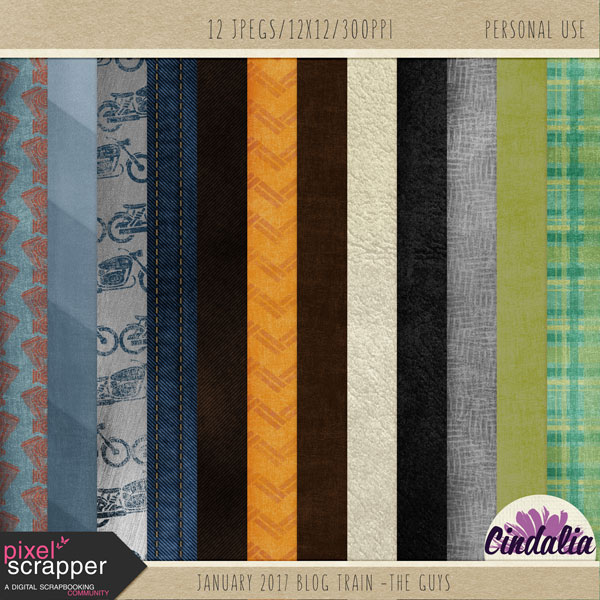
Here's my contribution to "The Guys" Pixel Scrapper blog train:
Pixel Scrapper, blog train, digital, scrapbooking, freebie
The Guys
Download the papers here.

I'm still working on a set of tags, so you may want to stop back later this week.

Don't forget to check out the other amazing contributions on this blog train here.

Thanks for coming by, and I hope to see some of your creations.  If you'd like, please leave a link in the comments so I can check them out!  Also, I LOVE comments, they really make my day:)!

Hope your New Year is a crafty one!

Thursday, December 1, 2016

Hello December! Another Pixel Scrapper Blog Train!

Another month has passed and it's time for another blog train at Pixel Scrapper.  To tell you the truth, I just barely got this one done.  The theme this month is "At the Table", and for some reason I couldn't get very inspired.  It's difficult not to think of the holidays in December, but I didn't want to do a holiday themed kit because many designers on the blog train already had that area covered quite nicely.  So I stuck to something more generic which can be used for any time of year.

I hope you can use these papers and journal cards along with the other beautiful creations the designers have come up with this month!  Find them here.  Download my contributions below the previews.
Pixel Scrapper, Digital Scrapbooking, December, 2016, blog train, free digital papers
 Download the papers here.

Pixel Scrapper, Digital scrapbooking, December, 2016, free digital elements
 Download the journal cards here.

Thanks for coming by and I'd love to hear from you in the comments.  I appreciate every one of them, they make my day!  Seeing what you create would make my day even more, so please leave a link if you feel like sharing!

I hope your holidays are peaceful and full of joy!

Have a crafty day!

Tuesday, November 1, 2016

Pixel Scrapper Blog Train: Enchanting Autumn

This month has been quite busy for me, so I didn't get much done for this month's blog train at Pixel Scrapper.  

I did manage to get some papers done, however, and I hope you can use them with the other creative offerings on the train which you can get here.

Download the papers below the preview.
Pixel Scrapper, Blog Train, scrapbooking, digital scrapbooking, free, Autumn, Fall,

Download here.

Thanks so much for coming by!  If you use these papers in a layout I'd love to see what you created!  Please leave a link and/or a comment,  I really appreciate knowing what you think!

Have a Crafty Day!

Saturday, October 1, 2016

The Pixel Scrapper Blog Train - Running Late!

Phew!  I didn't think I was going to make it!  I've finally finished this month's blog train kit, for which the theme is "School of Art".  This one was quite a challenge because I had so many ideas, but not the ability to bring them to fruition!  

My take on the theme is "Kid Art".  I thought it might be useful to those who have kids who bring home so many wonderful pieces of art.  Sometimes the art itself doesn't last, so how about scrapping it and keeping the memory forever?

I hope you find this kit useful!  Download links are below each preview.

Pixel Scrapper blog train, Digital, Photoshop, Scrapbooking, October, 2016, freebie
 Download elements here.

Pixel Scrapper, blog train, Photoshop, Digital, Scrapbooking, October, 2016, freebie
Download paper pack 1 here.

Pixel Scrapper, blog train, Photoshop, Digital, Scrapbook, October, 2016, freebie
 Download paper pack 2 here.

Don't forget to check out the kits from the other designers at the Pixel Scrapper forum.  While you're there, ask them how they get done so fast (LOL)!

Thanks so much for coming by!  I'd love to know what you think, and I'd love to see what you create!  Feel free to leave a link or a comment, or both :).  I really appreciate it!  Have a Crafty Day!


Thursday, September 1, 2016

Oh Happy Day! The Pixel Scrapper Blog Train is Here!

Hello digi scrappers!  The Pixel Scrapper blog train has returned, and freebies await you...  (If you don't know what a blog train is, see this post.)

This month's theme is "Keep It Moving".  My favorite (and only) exercise is the simple act of walking.  I enjoy walking owner-less dogs with my friend Betty, and I also love to walk my dog every night with my 14 year old son.  Since I started walking regularly I've felt the benefits both mentally and physically.  I have more energy and feel more positive, not to mention I'm missing a few pounds and I'm not looking for them!  I thought walking fit perfectly into the "Keep It Moving" theme, so I went with it.

Hopefully you can use these papers and elements to tell your story, and if you do, please leave me a link so I can see your creations!  And don't forget to check out all of the other amazing blog train contributions on the Pixel Scrapper forum.

Download my contributions below: 
digital scrapbooking, free, pixelscrapper, Cindalia, photoshop
Download paper pack 1 here.

digital scrapbooking, free, pixelscrapper, Cindalia, photoshop
 Download paper pack 2 here.

digital scrapbooing, free, pixelscrapper, blog train, Cindalia, photoshop
 Download paper pack 3 here.

digital scrapbooking, free, pixelscrapper, blog train, Cindalia, photoshop
Download the element pack here. 

Happy scrapping to all of you.  And remember I'd love to know what you think and I'd love to see what you make so leave a link in the comments!

Thanks so much for stopping by and Have a Crafty Day!  

Monday, August 1, 2016

Hello Again! A Digital Scrapbooking Freebie for You! Links UPDATED!

Hello there! If you're into digital scrapping, stick around, there's a freebie in it for you.

As much as I love paper crafting, I've grown to love digital scrapping even more, so much so that I'm trying my hand at designing some things.  Along my journey I've found a wonderful site called Pixel Scrapper.  It's a great place to learn as well as pick up some freebies that the talented designers over there create. It's also a relaxed environment for newbie designers like myself to dip their foot into the design pool and see how it goes.  Every month they host a blog train.  What's a blog train?  It's an event where designers spend their time creating digital goodies and share them freely on a blog or in the forum at Pixel Scrapper.  For the month of August the theme is "Back to Nature", and everyone who participated has graciously created free digital scrapbook papers and elements with this theme in mind.

As for my blog train contribution, this will be the very first time I've shared anything I've created with anyone.  I am both very excited and scared to death! I hope you can use what I've spent the last month creating.  I'd love to know what you think as well, both good and bad, because it's the only way I can learn.

The Back to Nature theme brought visions of mountains to my head when I first thought of it, and I wanted to focus on the beauty of nature and not so much camping and s'mores.  I'm not sure I accomplished this, but you can take a look at the previews and decide for yourself!

My heart is beating fast as I type this.  Yes.  That's how nervous I am! 

My design name is now Cindalia, as I did not think icraft2create was appropriate.  If all goes well I'll start another blog with this name.

You can download these files here and here. 

Once again, I hope you can use these papers and elements when you're telling your story.  I would also love to know what you think, so please leave a comment.  I would love honest opinions, as I really want to learn so I can improve!  Thanks so much for sticking around!

Have a Crafty Day!

Tuesday, September 8, 2015

Happy 1st Day of School!


First Day of School, Cards, acronym, Sassy Designs, Lettering Delights, Fall, Autumn, School
Several Cool Hours Of Ongoing Laughter!!
It's the first day of school in my area, so I made a set of cards for the three of my children who are going back.  My son told me about the acronym "Seven Crappy Hours Of Our Lives", and I knew I had to come up with something better!  Honestly, none of my kids appreciated these cards, but I had a blast making them!

It feels so good to get back into crafting mode, as well as on a schedule again.  I've been quite sick for several weeks, and finally I feel like I'm on the mend.  I've never gotten such a nasty cold in the middle of August!

How about a calendar?  Yup, made a calendar for September, with you guessed it, a back to school theme.
Back to School, September, Fall, Autumn, School, Fancy Pants, Photoshop, Digital, Scrapbooking
Once again I printed it out at 8in.x8in.  Last month I made a stand to put my calendars on in this post.  So far it's working out well and I don't miss having a larger 12in.x12in. calendar.

I found a great place to learn Photoshop techniques called Digitalscrapper.com.  They have plenty of free videos, and you can also sign up for Premier which gives you even more videos as well as digital goodies!  This is where I learned to create folded corners, which I tried out on this calendar.  It's an easy technique, but I want to practice a bit more.

Of course with today being the first day of school, I had to take some pictures of my two Middle Schoolers getting on the bus.  They did not want any part of it, but how could they deprive their mother of a scrapbooking opportunity?  I had already made a layout using files from SVGCuts.com.  Making a digital page this way is so quick and easy!  I put this layout together much the same way I did the one in this post.  Now the memory of my daughter's first day of Middle School and my son's first day of 8th grade is on a page.
First Day of School, Middle School, 2015, SVGCuts.com, Lettering Delights, Lori Whitlock, Photoshop, Digital, Scrapbooking, Fall, Autumn

I decided to include the countdown calendar I made from a previous post in this layout because I wanted to try blending two photos together.  Believe it or not, that was the most time consuming part of creating this page.

That's it for now.  Let me know what you think, or if you have any questions.  Until next time.....
Have a Crafty Day!

Items Used:
 Acronym cards:
 Lunchbag digital paper from Sassy Designs
 Kraft Solid digital paper from Weekend at Home Kit by Kate Hadfield
 Georgia-Pacific white cardstock
 Bebas (Font)
 SNF Sketchy (A+)
 Advert (Font- Are you ready...)

 September Calendar:
 Off To School digital kit from Fancy Pants
 LD Writer's Cramp (Font(colored in)- September, 2015)
 Arial (Font- Numbers)

 Layout:
 Make The Cut
 Miss Baker's Classroom SVG Kit
 School Rules digital collection by Lori Whitlock
 LD Charming Bold (Font-Middle)
 LD Chalky (Font-6th & 8th grade)
 LD Hand (Font- Journaling)


Tuesday, August 11, 2015

Flip Calendar Day: August

calendar, flip calendar, DIY, papercraft, 3D, Bo Bunny, DCWV
Happy August!

An August calendar with a new twist, at least for me.  Since I'm in flip calendar mode, I thought I'd make one for my monthly calendar.  I used to print one 12"x12" calendar every month, but it seems like I'm always running out of ink in my wide format printer!

First, I created my calendar in Photoshop at 12"x12".  Once it was completed I reduced the size to 8"x8" which made it possible to print on my regular size printer.
Digital calendar

I then proceeded to make the flip calendar much the same way as the countdown calendar I made.  Since it's much bigger than that one, I had to use two 12"x12" sheets of cardstock and glue them together to form the base as in these pictures:

calendar, flip calendar, 3D, papercraft, DIY
I scored each sheet at 8.75", folded them and glued one flap on top of the other.  Using my Cinch binding machine, I punched binding holes in the top.  I put patterned paper on the front and backside of the base.  To sturdy up the base I put additional pieces of the same colored cardstock on the interior of it.  Then I bound the top with O rings.  This is how it looks:
calendar, flip calendar, 3D, papercraft, DIY, Bo Bunny, DCWV
I used a removable 8"x8" page protector for the calendar, so I can take it off at any time, or add another if I wish.

I decided it need a little something more, so I added some embellishments and a removable journal card.  The journal card is held on with magnets as I did on my countdown calendar.
Magnets work like a charm!
I can add important dates on the journal card, or anything I want. When the month is over I'll stick it inside the page protector with the calendar.

Thanks for checking out my calendar!  I've made one more, but I'll take a break from flip calendars....for now.

Let me know if you plan to make one of these.  They really are a lot of fun! If you have any questions, feel free to ask in the comments.

Items used:
Photoshop
Cinch Binding Machine
Zutter movable 8x8 page protector
.75" Zutter O Rings
DCWV Sweet Tangerine Stack
Bo Bunny Key Lime and Barefoot&Bliss Digital Collections
Milkshake Font by Laura Worthington

Have a Crafty Day!
 

Friday, April 3, 2015

Quick Easter Digital Layout Using SVGCuts Files

Want to scrap a quick page of your Easter photos this year?  Want to make your cut files do double duty?  Try converting your cut files into digital format (.png), clip some paper to them, and put together a page in no time!  The easiest way I've found to do this is to get cut files from a page that's already been laid out for you, and Mary at SVGCuts has done just that.  I chose to use the scrapbook page from Poplar Street Tulips to create this layout of Easter 2010.
SVGCuts, Echo Park, Digital, Layout, Easter, Lettering Delights, Poplar Street Tulips, Photoshop
Easter cuteness!
To convert the .svg files I imported them into Make The Cut(MTC), and exported them as .png so I could use them in Photoshop.  There are other programs that will convert files, such as Inkscape, you can even do it in Silhouette Studio, but I find MTC to be the most convenient.

Once the files were in Photoshop, I arranged them on a 12x12 layout just as Mary did.  I clipped some Easter papers to some of the shapes, and applied a glitter style to the egg, the background lace, and the trim at the top of the photo frame.

Since the frame did not have shapes to clip the photos to, I created them using the rectangle tool in Photoshop.  They were sized slightly larger than the openings in the frame, placed underneath the frame, and the photos were clipped to them.

Next I added some drop shadows and two elements not in the SVGCuts file but from the digital collection I used.

And there you have it, a layout that took me under an hour, and that includes the time spent converting the files and deciding what photos and paper to use.

As much as I love making things with paper, when it comes to getting layouts done, I really like going digital.  And when the layout is already done for you (thank you Mary!), it's super fast!  

Making your cut files do double duty as clipping masks makes buying templates unnecessary and stretches your crafting dollar!

So, what do you think?  Have you already done this with your digital scrapbooking?  Would you like to learn more about it?  I'd love to hear, so please leave a comment!

Have a Crafty Day and a Happy Easter!

Items used:
Make The Cut!
Photoshop
Easter Mini Theme by Echo Park
Poplar Street Tulips SVG Kit
LD Those Kids (font-2010)

I'm an affiliate for Make The Cut! and SVGCuts because I LOVE them and you will too!


Wednesday, April 1, 2015

April Calendar

Happy April Fool's Day!  Can't say I'm the sort of person who likes to play jokes on people, nor do I care to have one played on me, so I rarely participate in the festivities of this day.  Of course, with April comes more spring like weather, and that means rain.  Rain to provide ample water for the beautiful flowers.  I've already got daffodils in my yard, courtesy of whoever lived here before me, since I didn't plant them.  And what do you need for rain?  The same thing my April calendar has plenty of, clouds!
digital, calendar, photoshop, april, clouds, spring, rain, Echo Park, Splendid Sunshine, Aishart Extended
Rain, rain DON'T go away, keep watering the flowers!
I actually don't mind the rain with the warmer temperatures.  I can't wait to see the flowers bloom!

To make the clouds for the calendar I selected a cloud from the background paper using the magic wand tool, right clicked, chose layer via copy and filled the cloud with white.  Next I duplicated the cloud several times and lined them up to form the grid.  I also now have the cloud shape that I saved as a .png file for future use.

I chose not to line up the numbers since I wanted them to look random, like they were floating on the clouds.  This made creating the calendar much quicker. 

The raindrops are actually another paper from this collection, I just selected the white background with the magic wand and deleted it, then I changed the blending mode to multiply.

So, what do you think, should the rain go away or stick around?  Let me know what you think!

Hope your day isn't too tricky and Have a Crafty Day!

Items used:
Photoshop
Splendid Sunshine Collection by Echo Park
Aishart Extended (font-days, month, events)
LD Woodland (font- numbers)
 

Monday, March 2, 2015

March Calendar

It's been a very cold winter, and when it's cold, I don't move!  My craft room also gets a bit chilly, so not much happening there!  I did manage to take my computer to my warm and cozy bedroom where I created my March calendar:
Digital, Photoshop, Lettering Delights, Calendar, March, 2015
I had no idea what to do when I started to create this calendar, so I made some rounded rectangles using the shape tool in Photoshop, clipped some papers to them, and went with it!  Since St. Patrick's Day is coming, and green reminds me of warmer times, I went with that theme even though I'm not Irish.  It felt good to finally create something since I've been in hibernation mode for the last month.  My kids have missed so many school days due to snow, they'll probably have to go to school during the summer to make them up!  

I'm so glad digital crafting is an option when I just don't have the desire to paper craft.  Do you ever go into "hibernation mode" when the weather gets bad?  Now that March is here, Spring can't be too far away, right?

Look for signs of Spring and Have A Crafty Day!

Items Used:
Photoshop
Kiss Me I'm Irish Paper Pack
Kiss Me I'm Irish Journal Graphic Set
Kiss Me I'm Irish Cutset
LDJ Leprechaun Hand (font-numbers/days)
LD Cinch (font-events)
Sherina by Artimasa (font-month/year)      

Tuesday, January 13, 2015

A Calendar for January

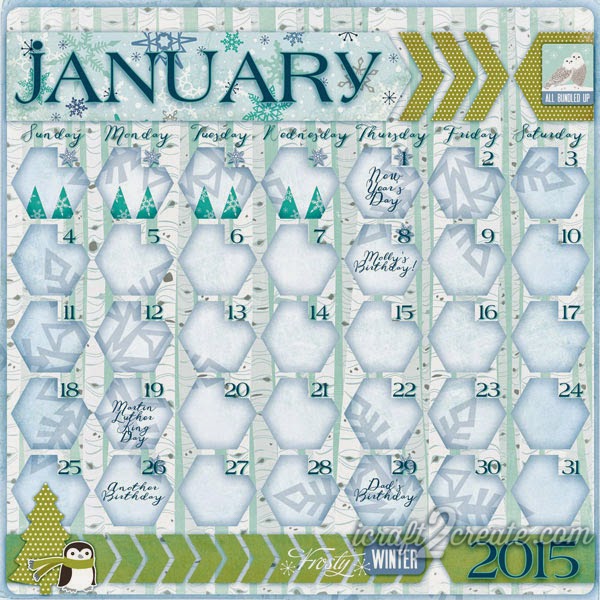
I know it's been too long since I was here last, so let me wish you a very belated Merry Christmas and Happy New Year!  Instead of crafting and blogging I've spent a lot of time getting the chaos creative clutter in my craft room under control.  Since creating digitally only requires the space my computer takes up, I was still able to finish my January calendar.
Digital, Photoshop, Calendar, January, 2015, Winter, Echo Park, Keepin' Cozy, Layout
Chilly!
You might guess that it was verrrry cold when I made this calendar.  In fact, in the twelve years I've lived in my area I've never experienced such low temperatures!  I feel lucky though, as we've not had any snow yet.

I made the template for this calendar back in December using Make The Cut.  I used the basic shapes that are included in the software to create the chevrons and the hexagon grid.  After exporting everything to png, I imported the shapes into Photoshop and clipped some papers from the Keepin' Cozy collection from Echo Park to them.  I created the numbers for the days the same way I created them for my December calendar.  I find it to be way more efficient than doing it in Photoshop.  Making templates ahead of time in Make The Cut also makes the process faster.

I'd love to find an even quicker way to design and create my calendars!  I did come across a site called timeanddate.com, which will create some cool calendars you can use to create a planner or even hang on a wall.  Of course you can't incorporate your own papers and such, but they do offer a lot of options to customize them, and it's free.  I like free.  I'll definitely be using them to create a planner for this year.

Do you like to make your own calendars or are you content to buy them at the store?  Let me know what you think, I'd love to hear your ideas!

Here's what I used:
Make The Cut! Software
Photoshop
Keepin' Cozy Collection from Echo Park
LD Handwritten Greetings Font (Days, events)
LD Hot Betty Font (Month, numbers)

 Keep warm and Have A Crafty Day!

Thursday, December 4, 2014

Calendar Day: December

It's hard to believe December, the last month of the year is here!  This year has gone by so fast, my head is spinning.  

To create my December calendar, I was inspired by Carina Gardner's calendar templates in the Silhouette store.  I decided to create my own in Make The Cut using a doodlebat from Lettering Delights.  Here's what the template looked like:Make The Cut, Lettering Delights, December, Calendar
Here's the finished calendar:
Digital, Photoshop, Calendar, December, Lettering Delights
I clipped two papers to the template and changed the blending mode and opacity on the top paper layer.  I added the ornament to each shape opening and applied a Photoshop style that I found for free online (can't remember where!).  I applied that same style to the month and year letters but tweaked the color a little bit.  I used Make The Cut to create the number grid, which sped up this tedious process (it's my least favorite part of making calendars!).  By typing each week of numbers into the text box with right justify selected, I was able to position the numbers on the ornament template rather quickly.  Gotta love the versatility of Make The Cut, it's not just for cutting!

So, that's my final calendar for 2014.  Now to get the ink for my printer so I can print it out!

Here's what I used:
Make The Cut Software
Photoshop
Lettering Delights:
Christmas Village paper pack
Christmas Village graphic set
Peppermint Holiday graphic set
Christmas Ornaments doodlebat
LD Colorado Slab font (December, numbers)
LDJ Jingleberry font (2014)

Have a Very Merry December and Have A Crafty Day!  

Thursday, November 27, 2014

Happy Thanksgiving!

Lettering Delights, Digital, Photoshop, Thanksgiving, November, Fall
Gobble 'til you wobble!
I hope you are enjoying a very Happy Thanksgiving with your friends and family!  I am spending this year at my mother's house where I'll be enjoying her delicious food!    Have a great day!

Files Used:
Giving Thanks graphic set
Fall Forget Me Nots paper pack
Harvesting Memories paper pack
LD Handwritten Greetings font
LD Colorado Slab font

LinkWithin

Related Posts Plugin for WordPress, Blogger...